Reporting and Logging
The extension supports a range of reporting formats.
By default, flaky tests will be flagged in the short test summary info in the console output as shown below.
Genuine failures will show as FAILED as normal.
Failures which have been classified as flaky by at least one active flakefighter will show as FLAKY.
================================== short test summary info ==================================
FLAKY test_flaky_reruns.py::TestFlakyRuns::test_create_or_delete - assert not True
FAILED test_flaky_reruns.py::TestFlakyRuns::test_fail - assert False
================================ 2 failed, 1 passed in 1.13s ================================
Writing to JSON
The extension is designed to work with pytest-json-report to create test reports as JSON.
To do this, you will need to pip install pytest-json-report, after which you can run pytest with the --json-report option to save the test report to .report.json by default.
The target path to save JSON report can be changed using the --json-report-file=PATH option.
Each test call will be assigned a metadata field that records the execution-level flakefighter results for each (repeated) execution.
Each test will be assigned a metadata field to record the test-level results.
In the example below, pytest was called with the DeFlaker, TracebackMatching (at execution level), and CoverageIndependence (at test level) flakefighters.
On the first execution of TestFlaky::test_flaky_example, DeFlaker classified the test failure as flaky, but TracebackMatching classified it as genuine.
On the rerun, the outcome of DeFlaker did not change, but TracebackMatching classified it as flaky.
Finally, CoverageIndependence classified the overall test as flaky.
{
  "nodeid": "test_flaky.py::TestFlaky::test_flaky_example",
  "lineno": 5,
  "outcome": "failed",
  "setup": {"duration": 0.00024656900131958537, "outcome": "passed"},
  "call": {
    "duration": 0.000256097000601585,
    "outcome": "failed",
    "metadata": {
    "executions": [{
      "start_time": "2026-01-19 11:19:06.214221",
      "end_time": "2026-01-19 11:19:06.214703",
      "outcome": failed,
      "flakefighter_results": {"DeFlaker": "flaky", "TracebackMatching": "genuine"}
    }, {
      "start_time": "2026-01-19 11:19:06.264956",
      "end_time": "2026-01-19 11:19:06.265155",
      "outcome": failed,
      "flakefighter_results": {"DeFlaker": "flaky", "TracebackMatching": "flaky"}
    }
      ]
    }
  },
  "teardown": {"duration": 6.307100011326838e-05, "outcome": "passed"},
  "metadata": {
    "flakefighter_results": {"CoverageIndependence": "flaky"}
  }
}
Note
The pytest-json extension is not officially supported, but the execution-level flakefighter results will be printed in a similar manner if you use this extension instead of the newer pytest-json-report.
Test-level flakefighter results will not be saved.
Writing to XML
The extension is designed to export results to JUnitXML when you run pytest with the --junitxml option.
The results will be saved in a <flakefighterresults> element as a child of each <testcase>.
Each execution-level result will be saved in an <execution> element.
The test-level results will be saved in a <test> element.
<testcase classname="test_flaky_reruns.TestFlakyRuns" name="test_pass" time="0.001">
  <flakefighterresults>
    <execution outcome="failed" starttime="2026-01-19T11:44:58.123723" endtime="2026-01-19T11:44:58.124223">
      <DeFlaker>flaky</DeFlaker>
      <TracebackMatching>genuine</TracebackMatching>
    </execution>
    <execution outcome="failed" starttime="2026-01-19T11:44:58.173746" endtime="2026-01-19T11:44:58.173929">
      <DeFlaker>flaky</DeFlaker>
      <TracebackMatching>flaky</TracebackMatching>
    </execution>
    <test>
      <CoverageIndependence>flaky</CoverageIndependence>
    </test>
  </flakefighterresults>
</testcase>
Writing to HTML
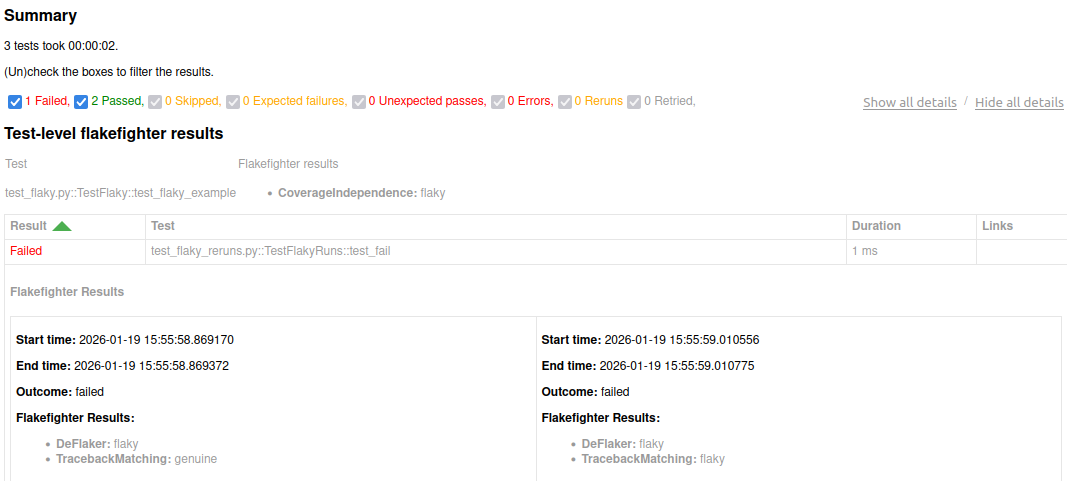
The extension is designed to work with pytest-html to export results to HTML when you run pytest with the --html option.
Test-level flakefighter results are shown just underneath the summary.
Execution-level flakefighter results are shown with the details of each individual test.